
This post contains affiliate links that support my writing at no cost to you. Thank you x
There is an incredible selection of little Linux commands that will do all sorts of things to your files, standard output and programs. Now and again I’m going to pick one out and have a play because you just never know when a little tool already exists that will do exactly what you need.
Today I’m going to look at nl, which prepends line numbers to any file that you pass it to.
Remember this one as “number lines” (think Numberwang on Peep Show). Don’t get confused and use ln, because that is for linking files 🙂
Okay, so I’ve got a little C program, and you can view the source code on the command line with cat:
cat main.c
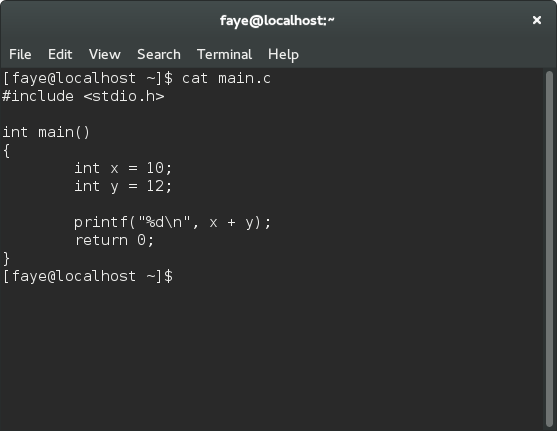
Very nice. Now let’s output the file with nl instead:
nl main.c

Look at that! Numbers down the side. Isn’t that handy?
But that’s not all.
Say you wanted to number all the lines – not just the ones with source code. This time use the flag -ba:
nl -ba main.c
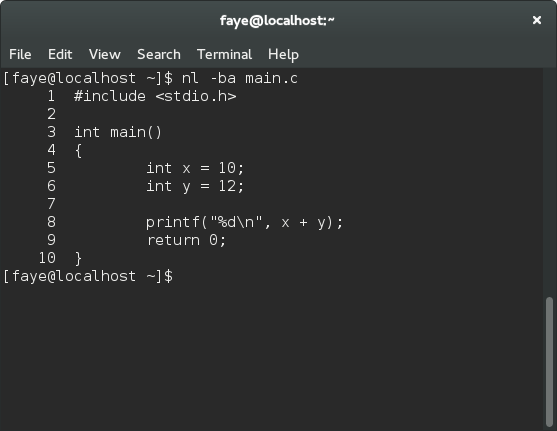
Nice.
Now let’s go a little retro, start the numbering at 10 and increase it by 10 each time (BBC Basic anyone?).
Use -v to start at your required number and -i to specify the increment:
nl -ba -v10 -i10 main.c

You can even add a string in front of each line.
Here I’ve added a colon after each number:
nl -ba -v10 -i10 -s": " main.c
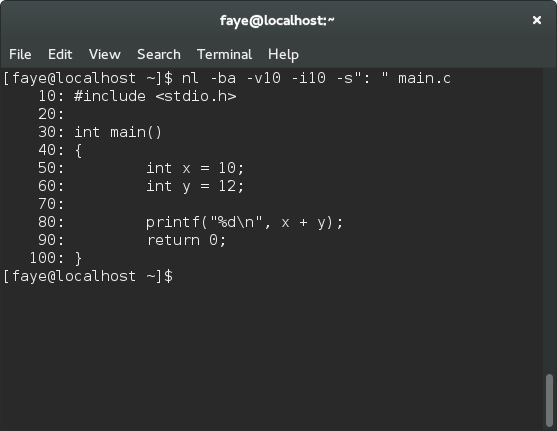
The only thing missing really is the option to add disco colours and flashing text 😉
Check out the man page for full details on all the options (man nl).

A little something I made
When I’m not writing about code, I design geeky mugs. If you’d like one for your desk, or know someone who would, take a look at my designs.

Disco colors:
# nl -ba -v10 -i10 -s “: ” main.c | awk ‘{ sub($1, “33[“(30 + $1/10 % 10)”;5;1m”$1″33[0m”); print $0; }’